Record your camera
You can use Mediasite Capture to record video captured with any connected webcam or external USB webcam.
Video recordings are useful when you are unable to present to your audience in person, for example communicating important information to others in your organization or demonstrating a physical activity.
To record your camera input:
- Launch Mediasite Capture and then select Camera on the Choose What to Record page.
- Mediasite Capture displays the Record page (you can see an example in the intro to this Help).
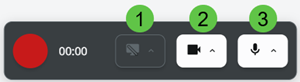
- Before you start recording, use the recording toolbar to change what you share with your audience.
|
1 |
Share display - click the screen icon to share your display. Open video settings - click |
|
2 |
Share camera - click the camera icon to stop sharing your camera. Open camera settings - click |
|
3 |
Mute microphone - click the microphone icon to mute your microphone. Open microphone settings - click |
 and choose what to share with your audience (repeat steps 2-4).
 - Click
 Show Live Preview near the top right to open a live preview of the recording with its own control buttons, and to use the teleprompter.
 - When you are ready, click Record
 . A countdown timer counts from 3-2-1 and then begins recording.
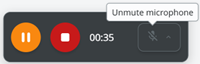
 - While recording, you can pause, resume, and stop recording. You can also mute or unmute your microphone as needed.