Adjust your microphone settings
To adjust your microphone settings:
- On the Recording page, click
 Open microphone settings in the recording toolbar.

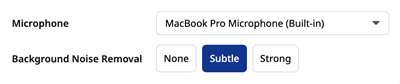
- Change the settings as required.
|
Microphone |
Select your preferred device in the list. |
|
Background noise removal |
Set the level of background noise removal to None, Subtle (for relatively quiet home offices or recording studios), or Strong (for recording in noisy spaces like a coffee shop or shared office). See also System Settings. |