Show Live Preview
Live Preview is a moveable mini-window that stays on top of your other apps, so you can check that you’re still in frame and not muted while presenting, and easily access the recording toolbar and teleprompter.
|
Note
|
To show Live Preview:
- On the Record page, click
 Show Live Preview near the top right.
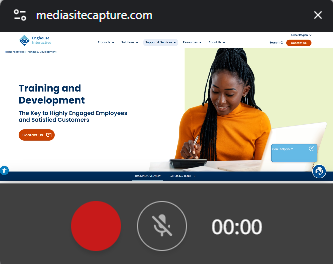
- To move Live Preview, drag it to the required location.
- To use the teleprompter, click
 Show teleprompter.
 - When you are ready, click
 Record . A countdown timer counts from 3-2-1 and then begins recording.
 - While recording, you can pause, resume, and stop recording. You can also mute or unmute your microphone as needed.