Create a blank presentation
Creating a blank presentation allows you to specify presentation data now and add content later.
To create a blank presentation that you can add content to later:
- Click Add Presentation and select Create Blank Presentation from the drop-down list.
- Enter a Title and Description for your presentation.
- Under Destination, choose where you want to store your presentation.
|
My Drafts |
This is the default destination for your presentations. When you store a presentation in your draft location, it is only visible to you. Until you are ready to share your presentation with others or publish it, we recommend keeping it here. |
|
Choose a new location |
|
|
Note For more information on shared folders and channels, see Move presentations to a shared folder and Move presentations to a channel. |
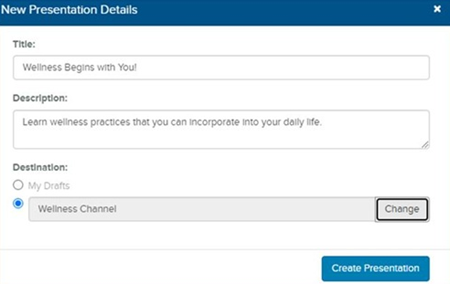
- Click Create Presentation. You can then record the presentation or upload media to it later and make it visible to other users.