Use captioning service
Closed captions provide text descriptions of the audio for audience members who are deaf or hard of hearing. Mediasite includes its own captioning service, Mediasite Captioning, which generates captions directly within the product.
My Mediasite also allows you to submit captioning requests through third-party captioning services using an existing account. Mediasite supports the following captioning services: AI Media, Amberscript, Automatic Sync Technologies® (AST), 3Play Media, 3Play Media-ASR (Automated Speech Recognition), Cielo 24, Verbit, and SyncWords (On-Demand & Live Captioning) to Text service using an existing account.
|
Note Use the Caption Editor to update your captions as needed . Contact your Mediasite administrator or captioning service provider for more information on the captioning service processing times and other details. |
To use a captioning service:
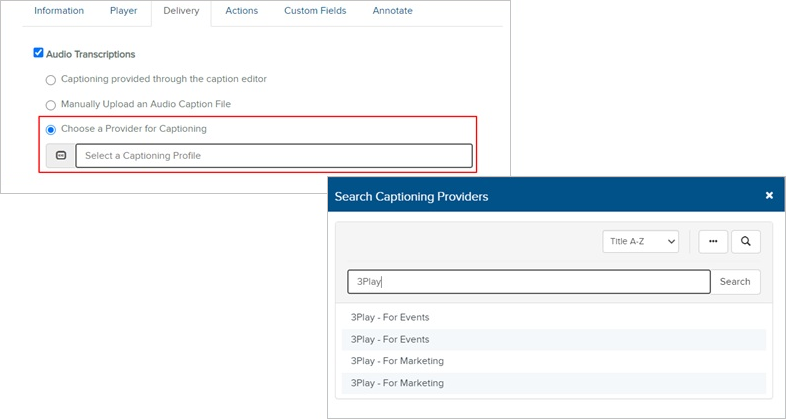
- Navigate to your presentation. Click Edit Details and go to the Delivery tab.
- Select the Audio Transcriptions check box and select the Choose a Provider for Captioning radio button.
- Click in the Select a Captioning Profile field. When the Search Captioning Providers dialog appears, search for and select your captioning service provider.
- When using third-party captioning services, you have the option to expedite the captioning job. You do this by selecting the Request Rush Processing check box. Selecting this option results in additional charges from your captioning provider.
- Click Save.