Share a presentation as a media package
Media packages are .zip files that you can download from Mediasite for archiving, sharing and migration purposes. They contain a range of assets associated with the presentation, including metadata, content files and any additional delivery formats such as caption files.
The following items, if available in the presentation, are included in the media package:
- Export manifest (MediasitePresentation_70.xml)
- Player banner image
- Presenter images
- Audio peaks image
- Presentation thumbnail
- Captions (.dfxp file)
- Podcast (.mp3 file)
- Alternate audio file
- Vodcast (.mp4 file)
- Media files (.ism/.isma/.ismv, .mp4, .wmv, etc.)
- Slide images
To share a presentation as a media package:
- Create a presentation or select an existing one.
- Update the presentation’s settings as needed and click Save.
- Mediasite generates the media package shortly after the presentation processes (after you record or upload media to it). The amount of time it takes depends on how busy your Mediasite is.
- Navigate to the bottom of the presentation’s properties page and click Download to Computer.
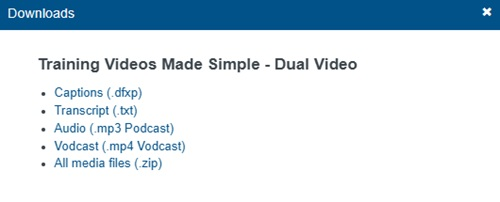
- When the Downloads dialog appears, click All media files (.zip).
- Save the file and navigate to the download location. The name of the zip file matches the presentation’s title.
- You can now share the media package with your users the same way you share other content.
|
Note If you have shared your presentation in a user channel and the Allow Presentation Download option is selected for the channel, your audience can download the presentation as an MP4 file from the channel page. For more information, see Create Channels. If this feature is not available, contact your Mediasite administrator for more information. |