Publish quizzes
After you have finished creating a quiz and adding questions, you must publish it to the presentation to make it available to your audience. A published quiz can be taken by any students with access to the presentation.
To publish quizzes to a presentation:
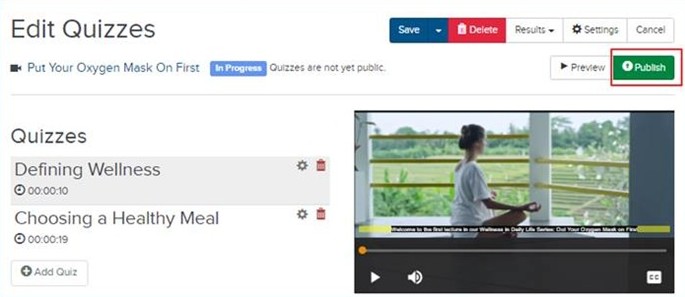
- On the presentation’s properties page, click Edit Quizzes.
- Click Publish.
- Click OK.
|
Note After you publish a quiz, it overrides the Presentation's Player options with the Quiz Player. Additionally, you are unable to update the general quiz settings or add new quiz questions and answers. You can click Unpublish to unpublish a quiz and make changes to it. However, unpublishing a quiz deletes all quiz results and affect the data available in quiz reports. For more information, see View detailed quiz reports. |