Specify Record Now application settings
As part of the Record Now applications, you specify how users are authenticated and the default values for ad-hoc recording.
Authentication considerations
When configuring your Podium PC for use with Record Now, you can enable automatic login using a Windows system user and then use Mediasite authentication for Record Now. With this first option, faculty members enter their Mediasite credentials to access Record Now.
Automated login and Mediasite authentication
To support automated login and Mediasite authentication:
- Use IT tools to set up a Windows system user to automatically log into the Podium PC.
- In the Record Now application settings, select Mediasite as the authentication method.
|
Note If your organization uses Mediasite Cloud, you must use Mediasite authentication. |
Single sign-on
You can also set up Podium PCs to use single sign-on, which means faculty members log into the Podium PC using their Windows credentials and are authenticated into Record Now using those same credentials.
To support single sign-on, in the Record Now application settings, select Windows as the authentication method.
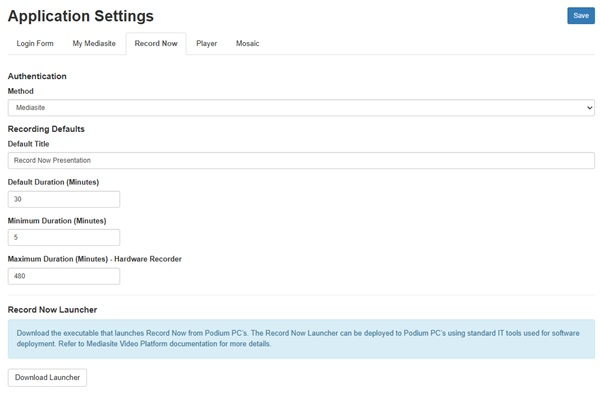
To specify the Record Now application settings:
- Click Settings > Application Settings.
- Click the Record Now tab.
- Under Authentication, use the Method drop-down list to select how to authenticate users when launching Record Now from a Podium PC:
- Mediasite - select this option to have users log into Record Now using the Mediasite login page.
- Windows - select this option to have users automatically authenticated using the same Windows credentials they used to log into the Podium PC.
- Under Recording Defaults, update the default values for ad-hoc recordings as needed:
- Default Title - the default title for all presentations created using Record.
- Default Duration - by default, all presentations are set to a 30-minute duration. Users can adjust the duration of their presentation as needed if it falls within the minimum and maximum duration values.
- Minimum Duration - the shortest presentations users can record with Record Now. The default value is 5 minutes.
- Maximum Duration (Minutes) - Hardware Recorder - users cannot record a presentation on a hardware Recorder longer than the time specified here when using Record Now. The default value is 480 minutes (8 hours). If users want to record longer presentations, we recommend they use scheduling to ensure there are no conflicts with other users.
- Click Save.