View your content storage report
View Your Content Storage Report to get a snapshot of how much storage space your presentations are using. This report is useful when determining what content to remove in order to reduce the amount of storage space you are using.
Each time you edit a presentation's media or upload media to a presentation, Mediasite creates a new revision. Previous revisions are saved for historical and recovery purposes. Consequently, these additional revisions and their accompanying media files increase the storage space required.
When viewing presentation details in your content storage report, you can sort the data as needed to locate items you are seeking quickly. For each presentation, the following information is available: presentation name, revision number, and storage space used (total, head revision, intermediate revisions, and archive revisions).
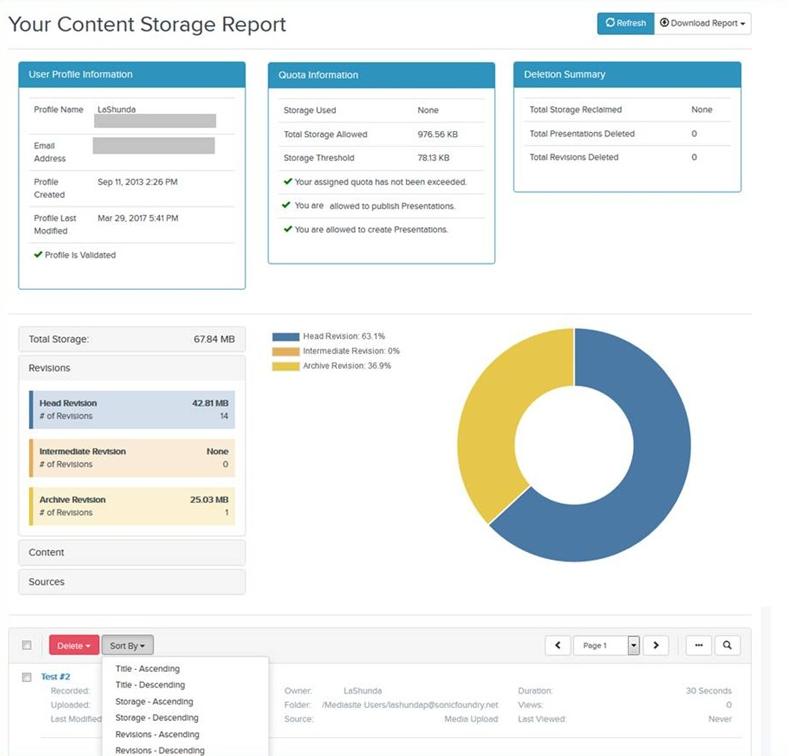
To view your content storage report:
- Click your initials in the top banner and select My Content Storage Report
- The report displays the following information about your storage space usage.
|
Report data |
Definition |
|---|---|
|
User Profile Information |
View profile data. |
|
Quota Information |
View data related to storage use and presentation permissions. |
|
Deletion Summary |
View data related to deletions you have made, and how much storage has been restored from these deletions. |
|
Total Storage |
The total amount of storage space your content is using. |
|
Storage |
Click the Storage tab to see the number of presentations you have, the amount of storage space they are using, and the amount of storage space your Mediasite administrator has assigned you. If your Mediasite administrator has not placed any limits on your storage usage, the label Unrestricted appears. |
|
Revisions |
Click the Revisions tab to see the number of revisions you have and amount of storage space used by the different revision types:
|
|
Content |
Click the Content tab to see the amount of storage being used by the following content:
|
|
Sources |
Click the Sources tab to find out the number of presentations added to Mediasite using the following content creation sources and the amount of storage space they use: Media Upload and Desktop Recorder. |
- To download your content storage data to an Excel or XML file, click Download Report.