Share channels
After you create a channel, you can share it with your audience by sharing its URL or QR code.
To share a channel:
- Click Browse Channels and browse to the channel you want or select the channel in Favorite Channels.
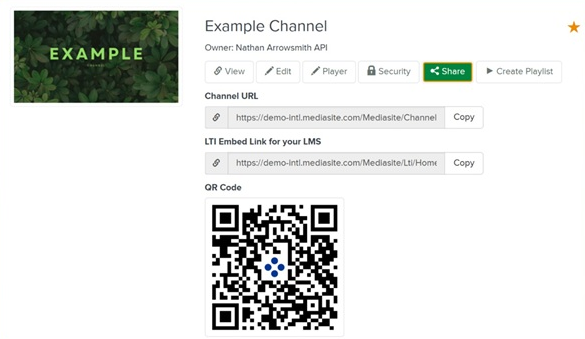
- Click the channel’s title to see its properties page. Share the channel using one of the following options.
|
Channel URL |
Click Copy and paste the URL in any application you typically use to share links with your audience. |
|
LTI Embed Link for your LMS |
Click Copy and paste the URL in your Learning Management System (LMS). |
|
QR code |
Right-click the QR code image and select Save Image As… to download it. Alternatively, you can copy the image. Share the image (paste or insert) with your audience via email, social media, or whatever method you typically use to communicate with your audience. |