Schedule Remove Adaptive Bitrate
Automatically removing Adaptive Bitrate content from presentations helps to manage storage space usage on Mediasite.
When this action is selected, all smooth streaming content is completely removed. After the system deletes the content, you cannot recover it from the Recycle Bin. This action never removes the last content type so the presentation must also have MP4 content for this action to be processed.
To schedule an action to remove smooth streaming content from a presentation:
- On the presentation’s properties, click Edit Details > Actions. Click Schedule new Action.
- Select Remove Adaptive Bitrate from the Action drop-down list.
- Specify when the action should be done.
|
Relative Date |
In the Relative From drop-down list:
In Relative Offset, specify the amount of time. |
|
Exact Date |
Select Exact Date and use the calendar to select the date, if you want the action to occur on a certain day. |
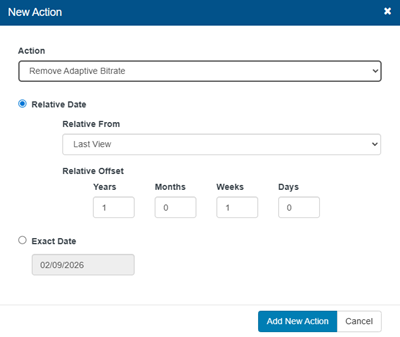
- Click Add New Action.
- When you have finished your updates, click Save.