Schedule Optimize Storage
Automatically optimizing storage helps to manage storage space usage on Mediasite.
To schedule an action to optimize storage for a presentation:
- On the presentation’s properties, click Edit Details > Actions. Click Schedule new Action.
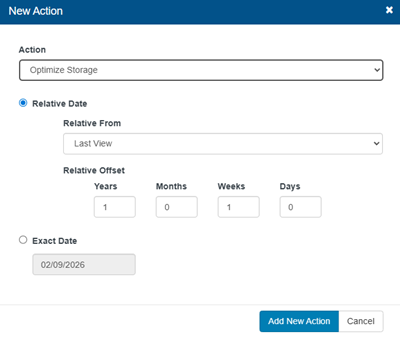
- Select Optimize Storage from the Action drop-down list.
- Specify when the action should be done.
|
Relative Date |
In the Relative From drop-down list:
In Relative Offset, specify the amount of time. |
|
Exact Date |
Select Exact Date and use the calendar to select the date, if you want the action to occur on a certain day. |
- Click Add New Action.
- When you have finished your updates, click Save.