Manually upload captions
Closed captions provide text descriptions of the audio for audience members who are deaf or hard of hearing. After you record your presentation, you can manually upload captions to it.
Mediasite supports multiple caption formats including Synchronized Accessible Media Interchange (SAMI), SubRip (SRT), Web Video Text Tracks (VTT), and Distribution Format Exchange Profile (DFXP).
To add captions to an on-demand presentation:
- Navigate to your presentation. Click Edit Details and go to the Delivery tab.
- Select the Audio Transcriptions check box and select the Manually Upload an Audio Caption File radio button.
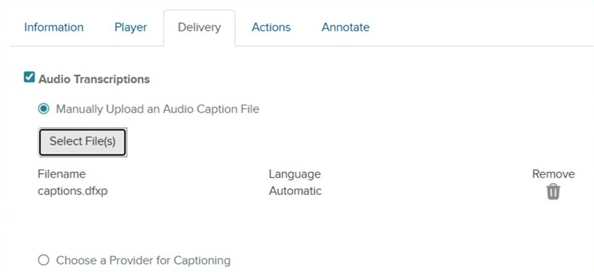
- Click Select a file to locate and select your closed caption file.
- Click Upload. When the file is uploaded, launch the presentation in Mediasite Player and verify your captions appear as expected.