Invite by email
You can share your presentation with users and groups by sending an email invitation that includes the presentation’s link and details. When users click the link, the presentation launches in Mediasite Player. If the presentation is not public, users must log in before they can view it.
You can send email invitations to people and groups inside and outside your organization
To email a presentation invitation to users or groups:
- On the presentation’s properties page, click Share Presentation.
- Click Invite by Email in the Share Presentation dialog.
- If you have not explicitly assigned permissions to the presentation, it inherits its permissions from its parent folder and a warning message appears. To invite non-Mediasite users, click Make Public.
- Enter the email address of the people you want to invite to view the presentation. Separate email addresses with a semi-colon.
- Enter a personal message to accompany the standard invitation text and link.
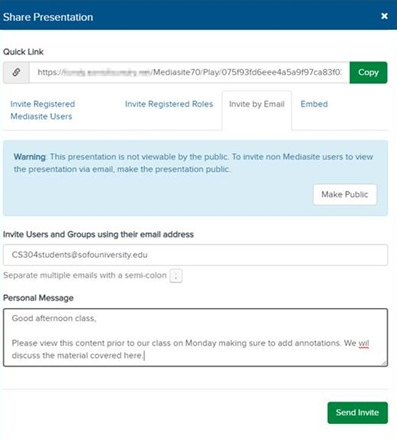
- Click Send Invite. The user receives an email invitation and is assigned view permissions to the presentation.
|
Note Emails are sent using the email server that your Mediasite administrator has configured to work with Mediasite. If this feature is not available or not working as expected, contact your Mediasite administrator for more information. |