Enable REA on a presentation
You enable the Review-Edit-Approve (REA) workflow on a presentation so that it can go through an iterative content approval process before being made available to your audience.
As part of the REA workflow, users that you assign approver permissions for a presentation, can review, comment on, approve, and reject the original presentation as well as any updates made to it. After a review is completed, the owner of the presentation or a user with editor permissions makes additional updates as needed. The process continues until the presentation is ready to be viewed by an audience.
To enable REA on a presentation:
- From the presentation’s properties page, click Edit Security.
- In the new window, select the Enable Review/Edit/Approve Workflow checkbox.
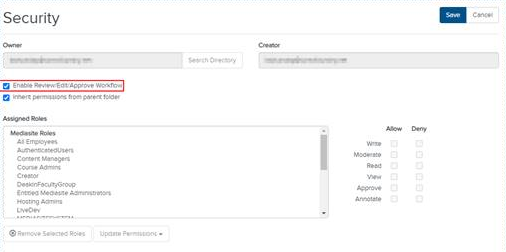
- When the review-edit-approve (REA) workflow is enabled, a REA Comments tab appears on the presentation’s properties page. Here you can see comments related to the REA workflow.